
A crypto swap quote can look certain until the market moves or the deposit arrives late. The useful choice is not simply “Fixed is safe” or “Floating is cheap”: it depends on whether you need a specific payout and can follow the order conditions exactly. Compare both modes for the same route, test your tolerance for a lower result, and use the checks below before sending any coins.
Summary: Choose Fixed when the receive amount matters and you can send the exact amount through the correct network, in one transaction, before the live period expires. Choose Floating only when you accept that the displayed receive amount is an estimate that may be recalculated downward. If a Fixed quote expires or the deposit details do not match, stop and check the order instead of sending again.
Fixed and Floating describe how MarketExchange determines the rate, not blockchain speed or which option is always cheaper. A Fixed rate is a temporary lock shown on the order screen. A Floating rate is set when the liquidity provider, the trading partner supplying the other coin, receives your cryptocurrency.
Use one decision rule throughout: compare like with like, then choose according to the payout you can accept and the send you can actually complete. The workflow is: same pair and amount → same networks → compare live receive amounts → check Fixed conditions → choose a mode → verify the order → send once.
Read the widget first and compare the same swap
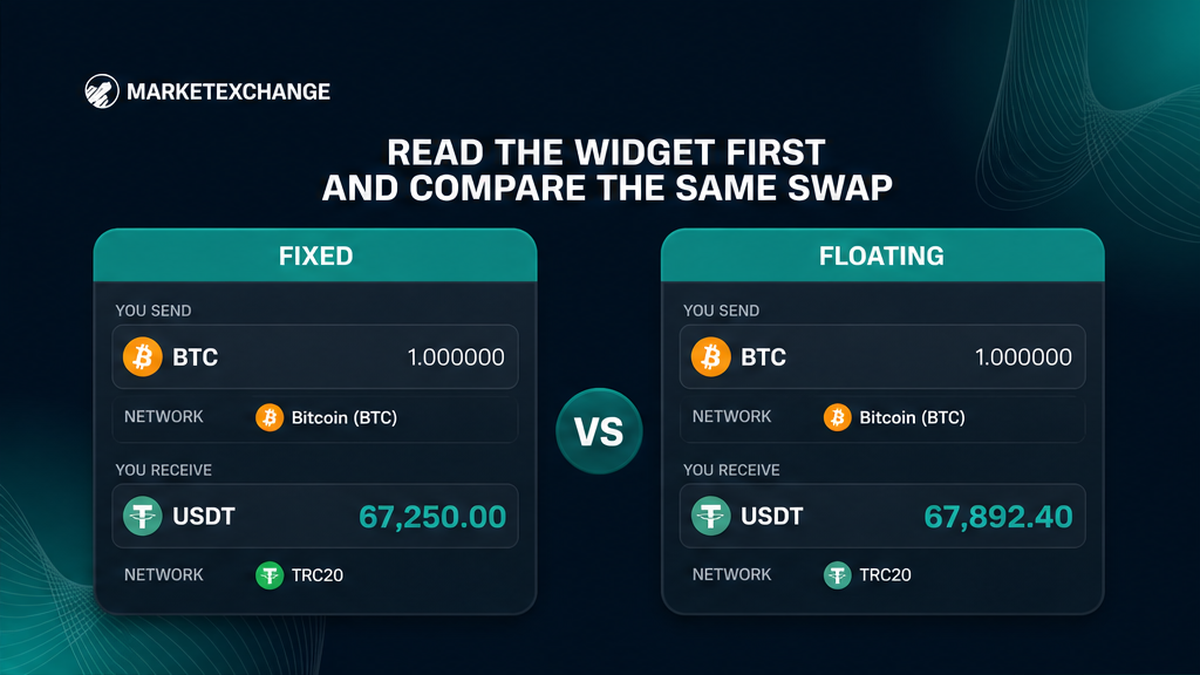
Open the MarketExchange swap widget and select the send asset, receive asset, amount, and blockchain networks. A network is the rail the coins travel on. The same token on another rail is a different route.
Compare “You receive” in both modes without changing those inputs. Do not put an old Fixed quote beside a fresh Floating quote: rates move, so that would compare two moments rather than two modes.
- Select the same send asset and send network.
- Select the same receive asset and receive network.
- Enter the same send amount in the widget.
- Record the live Fixed receive amount.
- Switch modes and record the live Floating estimate.
- Decide whether a smaller final payout would still work.
- Check whether you can meet every Fixed condition before choosing.
Do not treat an external price tracker as a promised payout. The useful figures are the live amounts for the same route in the widget.
Compare the settlement rules before choosing a label
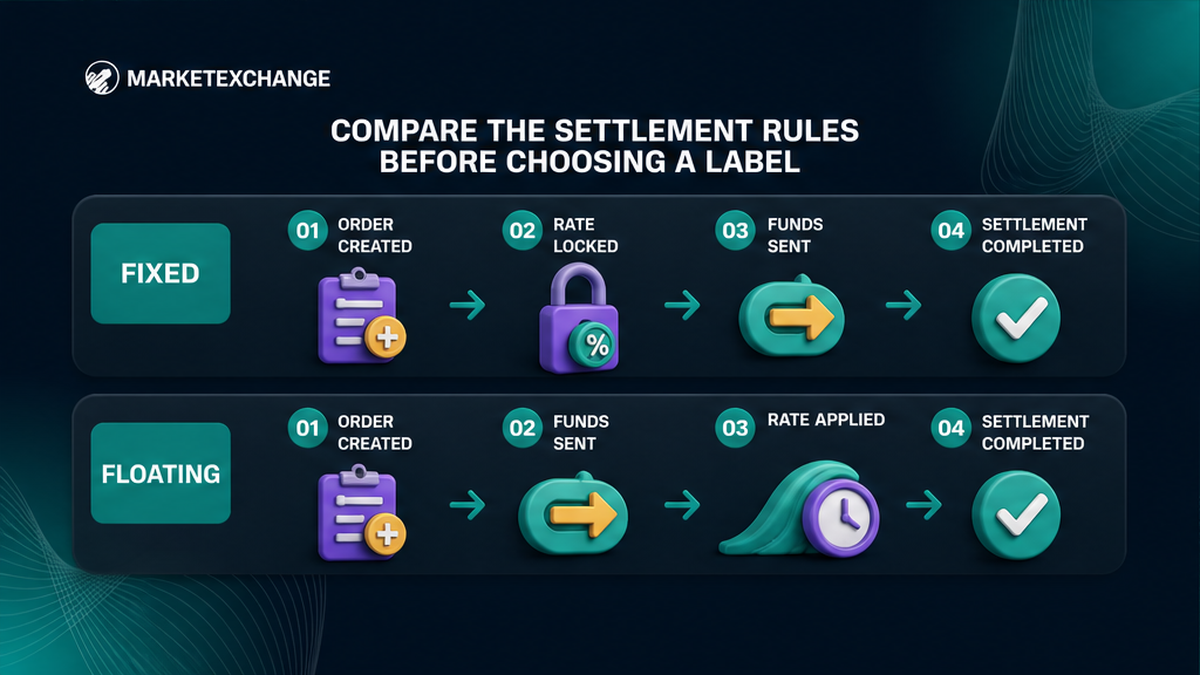
The difference is when the rate is determined. Fixed holds it for the limited period displayed on the Platform, subject to the order conditions. Floating uses the market rate available when the liquidity provider receives the funds.
| Decision point | Fixed | Floating |
|---|---|---|
| Rate basis | Locked for the limited period shown on the live order | Market rate when funds reach the liquidity provider |
| Receive amount | Conditional on meeting all Fixed order rules | An estimate that may be recalculated downward |
| Use it when | A target payout matters and an exact, on-time single send is practical | A lower payout remains acceptable |
| Main pre-send checks | Exact amount, correct network, one transaction, before expiry | Downward tolerance, correct details, delay risk |
| If the assumptions fail | Recalculation, a refund with deductions, or rejection may apply | No Fixed protection applies to market movement |
Neither mode means “always lower cost.” The MarketExchange Terms of Use give no universal Fixed or Floating fee percentage. Choose from the live quote and settlement rule, not a slogan.
Decision: Use Fixed for conditional payout certainty. Use Floating for a market-rate settlement only when a downward change will not break the purpose of the transfer.
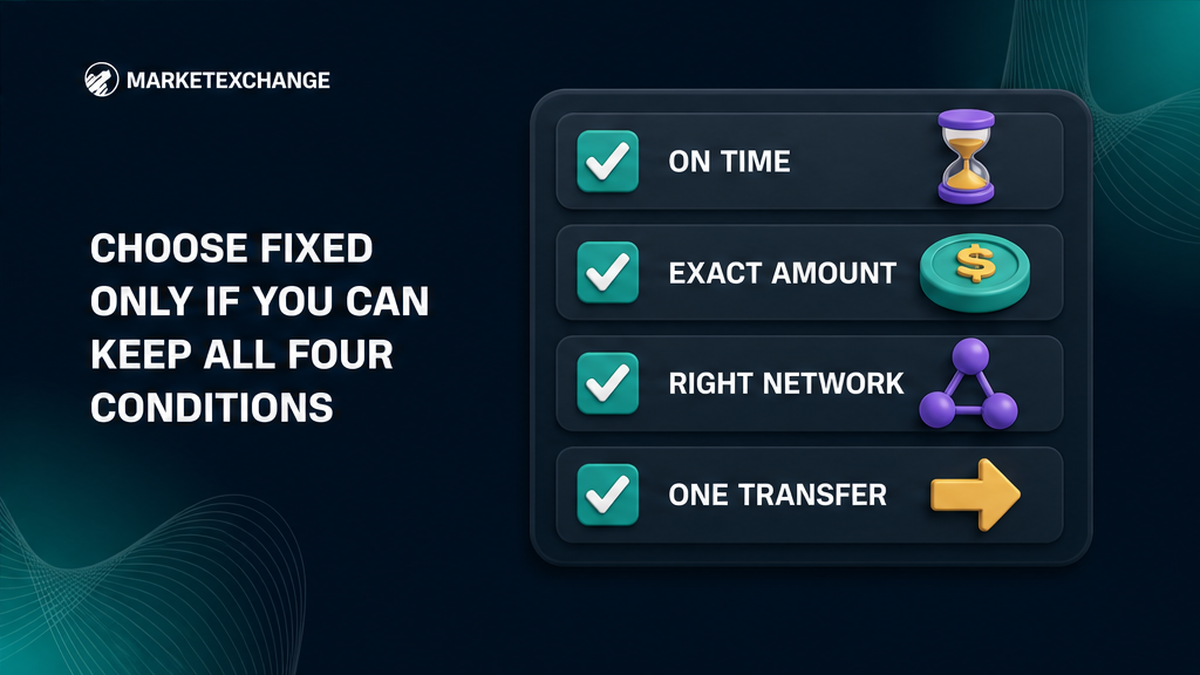
Choose Fixed only if you can keep all four conditions
Fixed can fit when you need enough coins for a payment or another target that would fail with a smaller payout. It still requires an operational check.
Confirm that your wallet is ready now
Create a Fixed order only when the funds and wallet are ready. Use the limited period shown by the live Platform, not a universal number of minutes. Fixed does not make the blockchain confirm faster.
Confirm the exact amount and one-transfer rule
Send the exact deposit amount shown. Check whether your wallet subtracts a network charge from the number you enter. Do not send a test part or later top-up: multiple transactions can invalidate Fixed handling.
Confirm the network before you broadcast
Match the order network with the sending wallet. Think of it as the railway line, not just the station name. If your wallet cannot use that network, return to the widget and select a route it supports.
Choose Fixed only when all four answers are yes: can you send before the displayed expiry, send the exact amount, use the correct network, and make one transaction? One “no” is enough to stop and obtain a more suitable live quote.
Choose Floating only if a downward result still works
In a floating rate crypto swap, the first receive figure is not locked. The rate is set when the liquidity provider receives your funds, so the displayed estimate is not a payout floor.
MarketExchange Terms say a Floating direction is recalculated only downward. Do not choose it expecting more than the estimate; judge the downside you can accept.
Set a practical minimum before you create the order
Write down the smallest useful receive amount. If the result arrives below the current estimate, can you still complete the task? If no, return to the Fixed checklist. If yes, Floating may fit.
Waiting before sending does not preserve the estimate. Unlock the wallet and complete access checks first, then create the order when you are ready.
Floating check: Displayed estimate → funds travel on the selected network → liquidity provider receives them → market rate is applied → receive amount may be recalculated downward.
Execute the selected rate without breaking the order
Follow only the current order screen. Verify the deposit and receive addresses plus any MEMO, Destination Tag, or Payment ID. These identifiers work like an apartment number: the address reaches the building, while the tag identifies the recipient.
Use this final send sequence:
- Read the selected rate mode on the current order.
- Match the asset and blockchain network in your wallet.
- Copy the current deposit address without reusing an old one.
- Enter the exact Fixed amount when Fixed is selected.
- Add every required MEMO, Tag, or Payment ID.
- Check the live Fixed expiry before approving the transfer.
- Send the deposit once and save the Order ID and TxID.
The Order ID identifies the exchange; the TxID is the blockchain receipt. Save both. A delay is not permission to change the amount, network, or transaction count.
This is a wallet-to-order flow, not a custodial balance. Address, network, and tag details remain your responsibility. Mandatory AML/KYC checks and eligibility restrictions also apply.
Stop and document the order if a Fixed condition fails
If the Fixed period expires before you send, do not fund that expired quote. Return to the widget and obtain a new live quote. Never assume that an old address, amount, or rate has been extended because the page is still open.
If you sent after expiry or with a mismatch, do not add a correction. Save the Order ID, TxID, route, amount, and status. Check the order, then contact official MarketExchange support if needed.
You cannot choose the result in advance. MarketExchange may recalculate at the current market rate, refund after applicable deductions, or reject technically impossible processing. A refund is neither automatic nor necessarily full.
Your safe next move depends on whether funds left your wallet: not sent → create a fresh quote; sent → do not resend → save evidence → check status → use official support. This boundary prevents one rate problem from becoming two deposits.
Frequently asked questions
Does a Fixed crypto rate guarantee confirmation time?
No. Fixed concerns the rate for the limited period shown on the order and remains subject to the order conditions. It does not make a blockchain confirm faster, so prepare the wallet and network before creating the order.
Can a Floating swap receive more than the estimate?
Do not plan for that on MarketExchange. Its Terms state that a Floating direction is recalculated only downward. Confirm Floating only if a lower receive amount would still be usable.
What should I do if the Fixed timer expires before I send?
Do not fund the expired quote or reuse its deposit details. Return to the widget, create a fresh live quote, and check the new order from the beginning.
What if I already sent after the Fixed period expired?
Do not send again. Save the Order ID and TxID, check the visible order status, and give those identifiers to official support if help is needed.
Can I split a Fixed deposit into two transactions?
No. Multiple transactions are one of the conditions that can invalidate Fixed handling. Prepare the full exact amount and send it as one transaction, or do not fund the order.
Will an expired Fixed order be refunded automatically?
No automatic refund is promised. Possible handling includes recalculation at the current market rate, a refund with applicable deductions, or rejection when processing is technically impossible. Stop sending and check the specific order outcome.